


Applies to: BI 4.2, 4.3, BI 2025 · Reading time: 8 min
In short. “End of maintenance” does not mean “end of BusinessObjects”. It means a version no longer receives fixes, while the platform keeps evolving: SAP has shipped BI 2025, announced BI 2027 and BI 2029, and published a statement of direction committing to maintenance for years to come. For an organisation on 4.2 or 4.3, the question is therefore not “should we leave BO?” but “how do we upgrade without redoing everything, and use the opportunity to modernise usage?”.
What exactly does “end of maintenance” mean?
SAP distinguishes several phases in a version’s life:
- Mainstream maintenance: fixes, security patches, minor new features, support for new OS, browsers and databases.
- Security fixes only: after mainstream, a period during which only critical vulnerabilities are patched.
- Customer-specific maintenance (CSM): support still answers, but no longer delivers fixes. The platform keeps running; it is the environment around it (OS, JDK, browsers, drivers) that eventually stops being compatible.
In practice, a 4.2 server still runs today. What becomes risky is the lack of security fixes and the inability to follow infrastructure updates (Windows Server, Linux, Java, database connectors). Exact dates per version are in SAP’s Product Availability Matrix, better consulted than memorised: they have been adjusted several times.
SAP’s roadmap: a release every two years
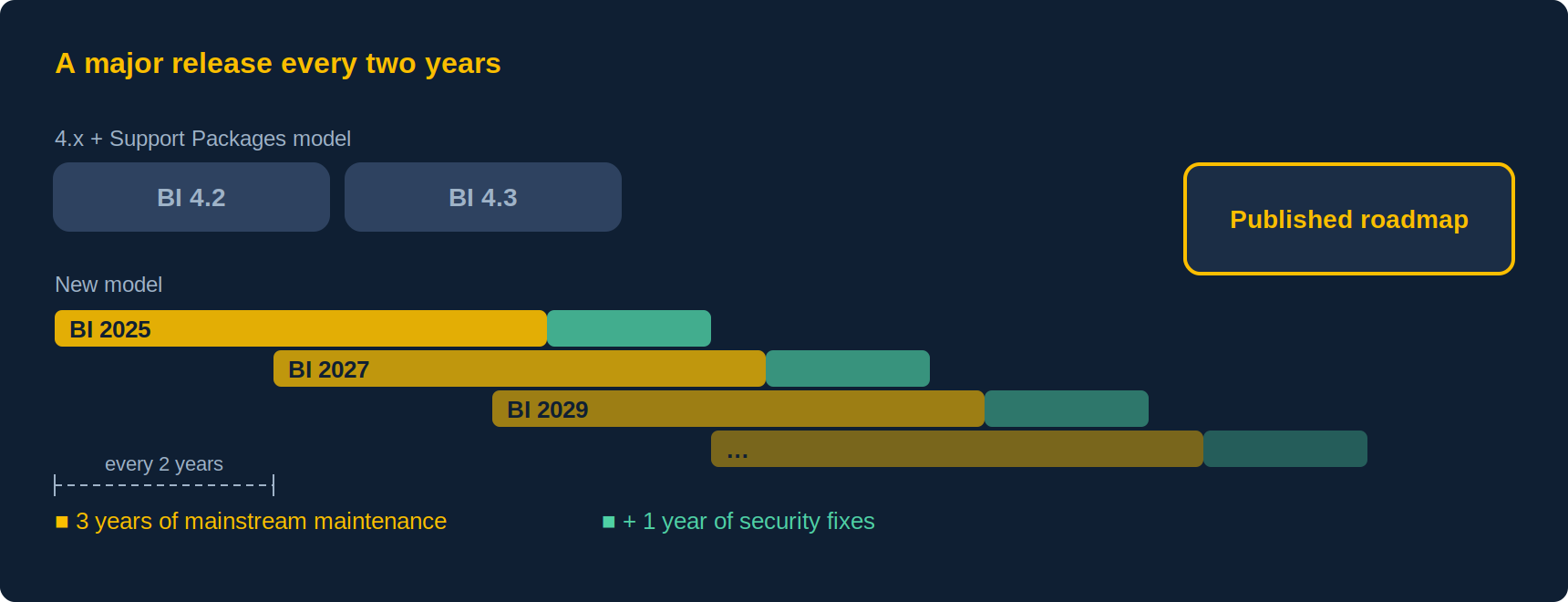
The change of strategy matters more than the dates. With BI 2025, SAP moved from a “4.x + Support Packages” model to major releases every two years (BI 2025, BI 2027, BI 2029), each with three years of mainstream maintenance then one year of security fixes, and regular patches instead of Service Packs. The SAP Analytics statement of direction commits BusinessObjects maintenance “at least” into the early part of the next decade, and the announced cadence suggests the roadmap does not stop at BI 2029.
The takeaway: BusinessObjects is a product with a published roadmap, which few on-premise BI tools can claim. SAP Analytics Cloud exists alongside it as the cloud offering, not as an imposed replacement.
Three misconceptions
| Misconception | Reality |
|---|---|
| “BO is end of life, we must migrate to Power BI or Tableau” | The version is end of life. A tool migration takes years and rebuilds the whole semantic layer; a version upgrade keeps universes, reports, security and schedules. |
| “SAP is pushing everyone to SAP Analytics Cloud” | SAC is the cloud offering; BI 2025/2027/2029 is the on-premise offering, with its own roadmap. Both coexist and can connect. |
| “Webi is outdated, nobody builds dashboards with it” | Webi still has the strongest mass-reporting, security and distribution capabilities on the market. Its limit is visual presentation, which can be complemented without changing platform. |
What to do depending on your version
You are on BI 4.1 or 4.2
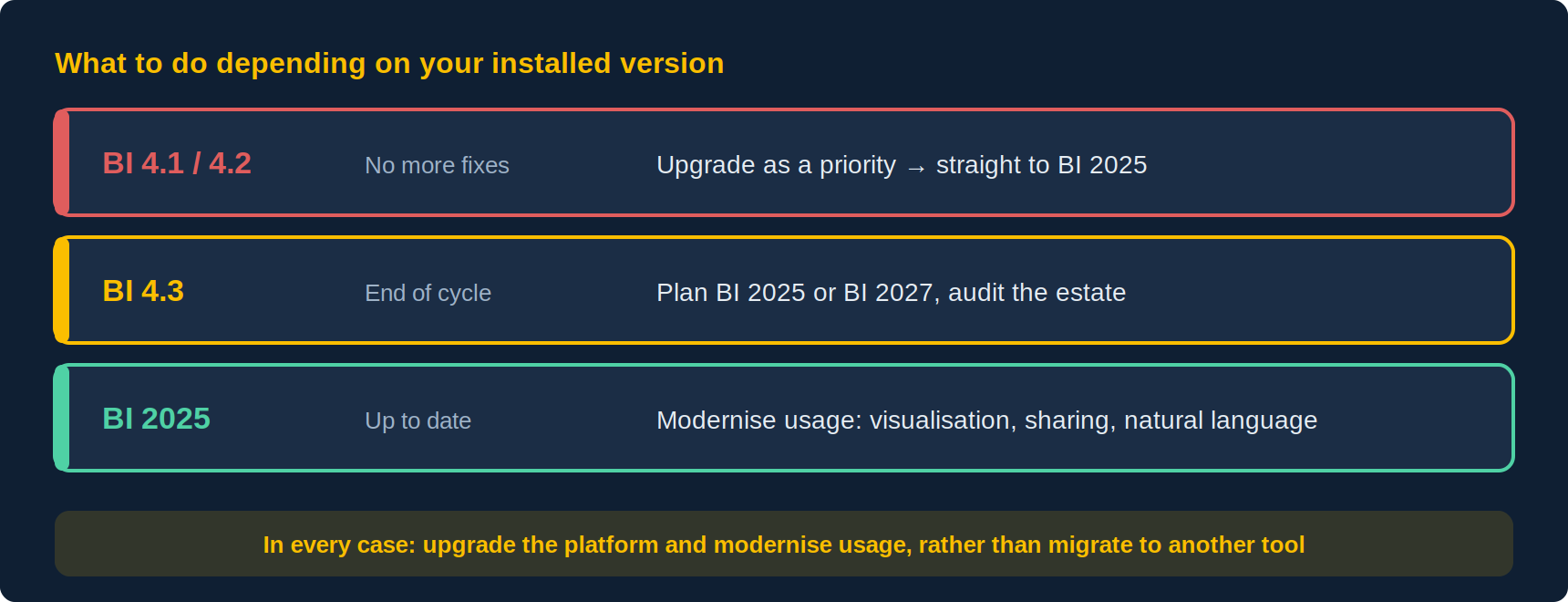
You no longer receive fixes. Upgrading is the priority, and it is lighter than feared: a BO version upgrade is a platform upgrade, not a migration. Universes, reports, users, groups, rights and schedules carry over. The real watch-points: UNV universes to convert to UNX, retired components (Dashboards/Xcelsius, old SDKs), Java and connector versions. The sensible target is BI 2025, and the recommended path runs in three steps: move to 4.3, test and validate, then move to BI 2025. Jumping straight from 4.2 is technically possible, but it deprives you of the stage where you confirm everything came back up on a version that is still maintained. We cover that path, and the option of staying on 4.3 to target BI 2027, in our version comparison.
You are on BI 4.3
You are on a version still maintained but at the end of its cycle. Choosing between BI 2025 now and BI 2027 later depends on your internal calendar more than on the technology — that is the subject of our version comparison. Whatever the target, use the interval to audit your estate: unused reports, redundant universes, orphan schedules. A leaner estate upgrades faster.
You are on BI 2025
You are up to date. The question becomes usage: why do business teams still ask for “something else” when the platform is there? Usually for three reasons: richer visualisations, dashboards shareable outside the Launchpad, and natural-language access. All three are addressed by extensions on Webi, with no new platform and no new data flows.
Expert view
Urgency is not read off SAP’s calendar. It is read off your own installation.
An end-of-maintenance date is the same for everyone; the risk is not. Two 4.2 estates can be one perfectly calm, the other in a critical position. The difference comes down to four things, and none of them is the date.
Your regulatory exposure. A server without security fixes is an audit finding. If you are subject to an IT audit, a certification, or a contractual clause on keeping systems secure, the question stops being technical: the deadline is set by the auditor, not by SAP.
Your infrastructure drift. It is almost never BO that forces the upgrade, it is what surrounds it. A Windows Server version change, a JDK to replace, a database driver no longer certified: the day one of the three moves for a reason unrelated to BI, an unmaintained version becomes a blocker.
Your dependencies on retired components. UNV universes, Xcelsius dashboards, old SDKs, MDX OLAP connections: each is a project in its own right, and their cost does not fall with time. The UNV conversion tool in particular disappears in BI 2025 — that is a window closing, not a deadline you can push.
Conversely, three things create no urgency at all: that a version is “old”, that a vendor keeps calling, or that a peer has migrated. The useful test is one question: if a security audit landed next month, what would it say about this server? If you do not have the answer, that is the answer.
Modernise rather than migrate: what it costs, what it avoids
| Upgrade + modernise | Migrate to another tool | |
|---|---|---|
| Semantic layer (universes) | Kept | Rebuilt |
| Existing reports | Kept | Redeveloped, often partially |
| Security, profiles, schedules | Kept | Redefined |
| User training | Marginal | Complete |
| Parallel run | A few weeks | One to three years |
| Visual and interactive gain | Through extensions on Webi | Native, but at the cost of everything else |
Frequently asked questions
Will my 4.2 server stop working?
No. It keeps running. It no longer receives fixes, which creates a growing security and compatibility problem with the rest of the infrastructure.
Do I need to go through 4.3 before BI 2025?
It is strongly advised. Jumping straight from 4.2 is technically possible, but the recommended route goes through 4.3: you move there, test and validate the estate, then move to BI 2025. The value is not the stepping stone itself, it is the acceptance phase it allows on a version that is still maintained. Check the path that applies to your starting Support Package in SAP’s upgrade matrix.
Does BI 2025 change Webi reports?
Existing documents open as they are. Changes concern the platform (Java, retired components, new Webi elements); the only reports to rework are those that used discontinued components.
Where are the official dates?
In the Product Availability Matrix and the SAP Analytics statement of direction, both public and maintained by SAP. Be wary of dates relayed by third parties without a source.
Sources and references
- SAP Community — “SAP BusinessObjects BI Future is clarified” (statement of direction, August 2025)
- SAP Community — “SAP BusinessObjects BI 2025 Updated Release Timeline and Maintenance Strategy”
- SAP Community — SAP BusinessObjects BI maintenance page
- SAP KBA 3540544 — BI 2025 Maintenance Strategy & Schedule
- APOS / SAP — webinar “Navigating Your Move to BI 2025 and Beyond”, February 2026
- Wiiisdom — “SAP BI end of life stages”
- SAP Product Availability Matrix (SAP for Me access) for per-version dates
👉 Discover Need4Viz and what we really bring to SAP Web Intelligence
Need4Viz extends SAP Web Intelligence with advanced dataviz, interactivity, automation and AI capabilities to transform your reports into real decision-making tools.
Discover Need4Viz