


Applies to: BI 4.2 → BI 2025 · Reading time: 10 min
In short. When an organisation asks “what do we do with BusinessObjects?”, it actually has five options, not two. They are not all mutually exclusive: most estates end up combining two or three. What sets them apart is what they keep (universes, reports, security, schedules), what they cost (licenses, project, parallel run, training) and what they bring (visuals, mobility, planning, hosting). The starting point is always the same: an estate audit. On a platform installed ten years ago, a large share of the reports is no longer opened by anyone; counting them in the project skews every estimate.
The five scenarios
1. Upgrade the platform in place
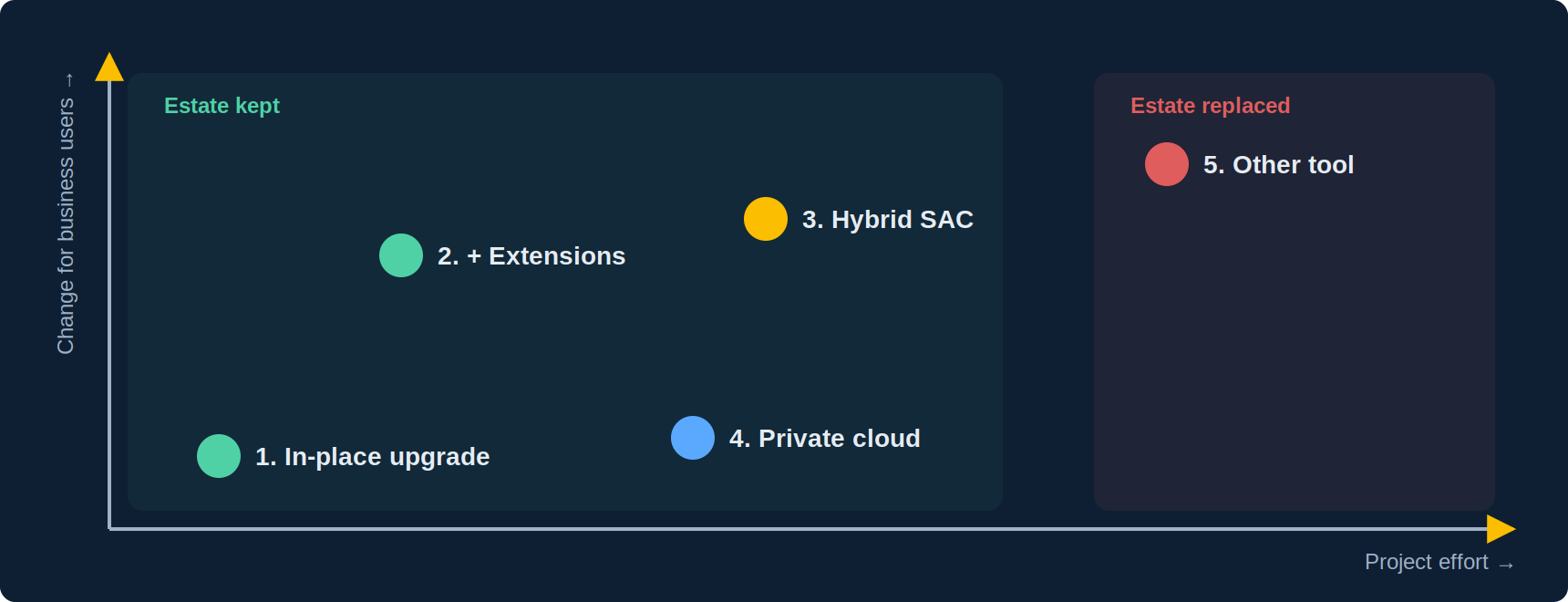
Move from 4.2 or 4.3 to BI 2025 (or BI 2027) on the same architecture. A BO upgrade is a platform version upgrade, not a migration: universes, reports, users, rights and schedules carry over. The real work items are known: converting UNV to UNX before BI 2025 (the conversion tool is removed there), replacing multi-source universes and MDX OLAP connections, reworking reports that used discontinued components, upgrading Java and drivers. It is the minimal scenario, mandatory to stay under maintenance, and the base for the next three.
Typical duration: 3 to 6 months. Keeps everything. Brings nothing visible to business users, except the new Webi elements for reports you rebuild.
2. Upgrade and modernise through extensions
Scenario 1, plus extensions installed on the platform to answer the three business requests that fuel the idea of migrating: modern visualisations, dashboards shareable outside the Launchpad, and natural-language access. Existing reports are enriched without rewriting, the semantic layer and security remain the universes’, and no parallel data flow is created.
Typical duration: a few weeks after the upgrade. Keeps everything. Brings visuals and sharing. It is the most frequent scenario among organisations that ran the audit before deciding.
3. Hybrid BO + SAP Analytics Cloud
BO remains the operational reporting and distribution platform; SAC is added for budget planning, predictive and some summary dashboards, reading the universes live through Live Data Connect. It is SAP’s official scenario, with no migration of universes or Webi reports. It makes sense when the planning need is real, or when the landscape is shifting to SAP cloud applications.
Typical duration: scenario 1 + 3 to 9 months for SAC. Keeps everything. Adds a platform, a subscription and a skill set. See our BO vs SAC comparison.
4. Move to Private Cloud Edition
The same BO platform, hosted and operated by SAP in a dedicated private cloud. You change hosting, not tool: content is transferred, universes point to the databases (left on site or moved), infrastructure operations disappear. Attractive for an IT department that wants out of server operations without giving up BO or accepting multi-tenant SaaS.
Typical duration: 3 to 6 months, often combined with scenario 1. Keeps everything. Changes the cost model (subscription) and source connectivity.
5. Migrate to another tool
Replace BO with Power BI, Tableau, Qlik or another. This scenario is legitimate in some cases: an imposed group strategy, disappearing BO skills, a small and recent estate. But it must be costed honestly: universes have no automatic migration equivalent, paginated operational reports and burst publications are the last to find a replacement, and the parallel run lasts until the last critical report is rebuilt. Projects that “migrate 2,000 reports” generally end up rebuilding 300, archiving 1,500 and keeping BO for the remaining 200.
Typical duration: 18 to 36 months. Keeps nothing. Brings a modern tool, at the cost of the semantic layer, distribution and training every user.
Comparison
| 1. Upgrade | 2. + Extensions | 3. Hybrid SAC | 4. Private cloud | 5. Other tool | |
|---|---|---|---|---|---|
| Universes kept | Yes | Yes | Yes | Yes | No |
| Reports kept | Yes | Yes, enriched | Yes | Yes | Rebuilt |
| Visual / interactive gain | Low | High | High (SAC side) | None | High |
| Budget planning | No | No | Yes | No | Depends on tool |
| User training | None | Light | SAC for some | None | Full |
| Parallel run | Weeks | Weeks | None | Weeks | Years |
| Relative project cost | 1 | 1.2 | 2 to 3 | 1.5 | 5 to 10 |
| Business risk | Low | Low | Medium | Medium | High |
Durations and relative costs are orders of magnitude from observed projects, not SAP figures; they vary with estate size and universe condition.
Before choosing: the estate audit
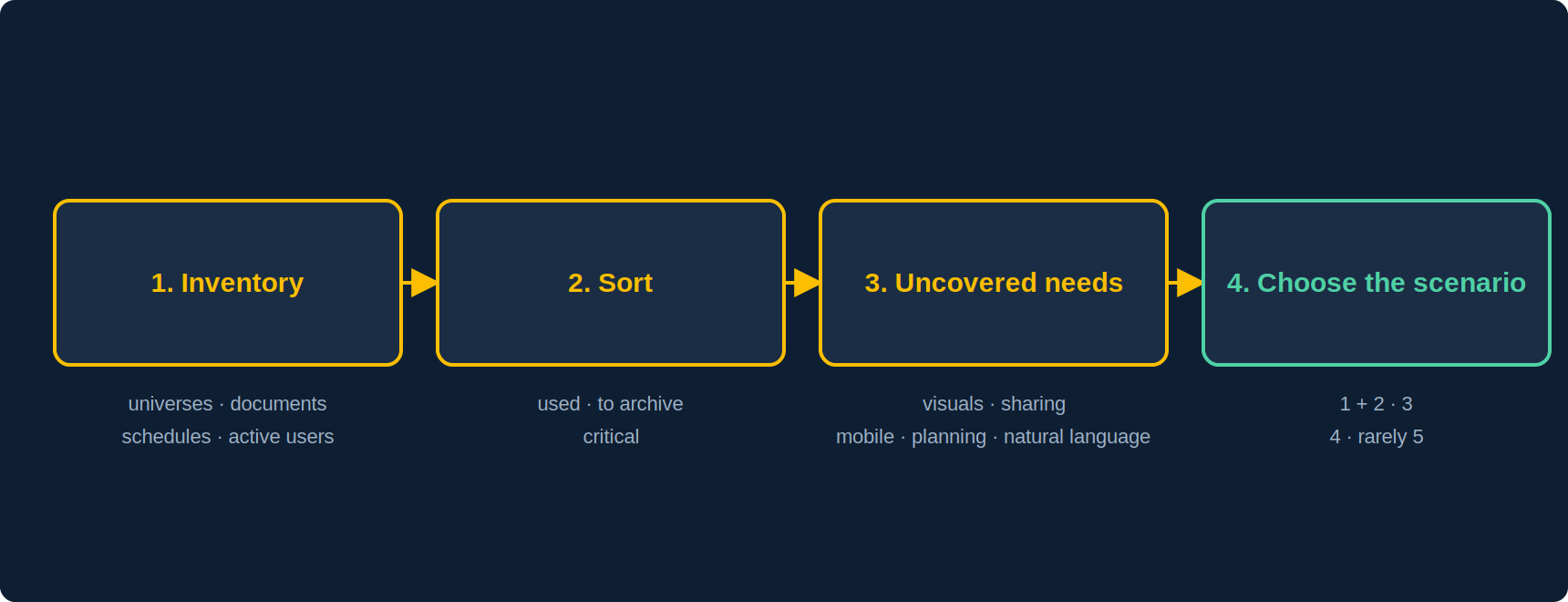
- Inventory: number of universes (UNV / UNX), documents, active schedules, users who actually logged in over the last twelve months. Auditor and the repository provide all of it.
- Sort: reports viewed, reports never opened (to archive), critical reports (regulatory, financial, distributed externally). This sorting typically halves the scope.
- List uncovered needs: what business users ask for that native BO does not do. Usually: visualisation, off-platform sharing, mobile, planning, natural language.
- Derive the scenario: each uncovered need points to a scenario (visuals and sharing → 2; planning → 3; operations → 4). Full migration (5) is only warranted when uncovered needs outweigh the kept estate, which is rare.
Frequently asked questions
Should we upgrade before deciding the rest?
Yes. Scenario 1 is the base for 2, 3 and 4, and is required to stay under maintenance. Even in a migration (5), an up-to-date BO secures the parallel run.
Can scenarios be combined?
That is the norm: 1 + 2 for most of the estate, 3 for planning, 4 to exit operations. The only exclusive scenario is 5.
Is there a BO → Power BI or Tableau migration tool?
Vendors offer universe and report converters. They speed up inventory and part of the conversion, but not the business logic of variables or distribution; expect manual rework on critical reports.
What about reports nobody opens?
Archive them outside production (BIAR or LCMBIAR export), remove them from the repository, and do not migrate them, whatever the scenario.
Sources and references
- SAP Community — “SAP BusinessObjects BI Future is clarified” (statement of direction)
- Christian Ah-Soon (SAP), “SAP BI 2025: What’s New In Web Intelligence and Semantic Layer” (removed components, UNV conversion)
- SAP Community — “Journey to Cloud”: SAC hybrid and Private Cloud Edition
- SAP Community — “Best of Both Worlds” webinar Q&A (no universe migration to SAC)
- Wiiisdom — “SAP BI end of life stages”
- Need4Viz field experience on BO upgrade, modernisation and migration projects
👉 Discover Need4Viz and what we really bring to SAP Web Intelligence
Need4Viz extends SAP Web Intelligence with advanced dataviz, interactivity, automation and AI capabilities to transform your reports into real decision-making tools.
Discover Need4Viz