


Applies to: BI 4.2, 4.3, BI 2025 · Reading time: 9 min
In short. SAP is investing heavily in AI, but not in BusinessObjects: Joule, predictive and agents are landing in SAP Analytics Cloud, Datasphere / Business Data Cloud and S/4HANA. BI 2025 ships no assistant, no natural language, no formula generation in Web Intelligence, and nothing is announced for BI 2027. For a Webi estate, that does not mean “no AI”: the most useful uses, creating a query in natural language, writing a variable, explaining a formula, recommending a chart, plug into the existing semantic layer without changing platform. This article covers SAP’s strategy, what AI really brings to reporting, and the conditions to do it properly.
Where SAP puts its AI
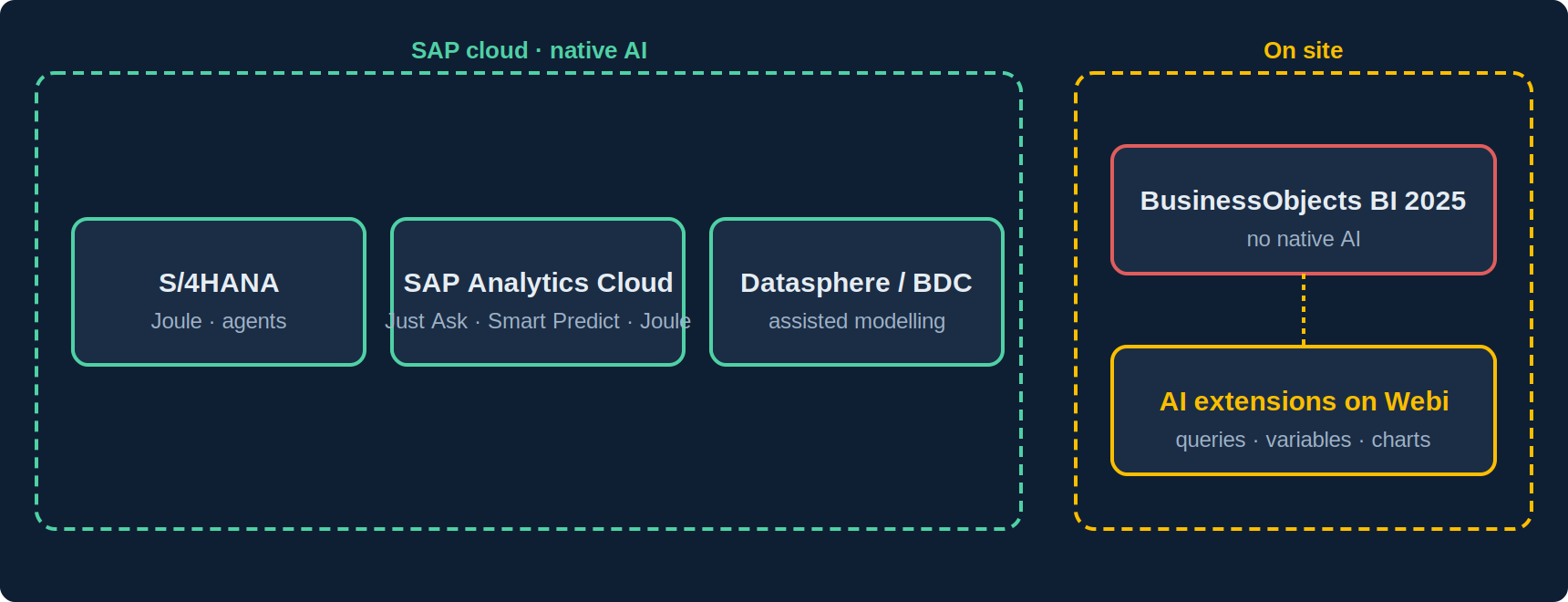
- SAP Analytics Cloud: natural-language queries (“Just Ask”), predictive (Smart Predict), Joule assistant to create and explain stories. It is the AI showcase of SAP analytics.
- Datasphere / Business Data Cloud: assisted modelling, catalogues, AI-readiness of enterprise data.
- S/4HANA and business applications: Joule as a cross-application assistant, agents on processes.
- BusinessObjects: nothing native. SAP’s statement of direction and the detailed BI 2025 what’s-new mention no AI feature in Web Intelligence; the published roadmap (BI 2027, BI 2029) covers report elements, WIDX, the platform, not AI.
The logic is consistent with SAP’s strategy: BO is the stable on-premise offering, SAC the innovative cloud one. But it leaves organisations with universes, thousands of reports and data that must stay on site with no native answer to a question every business team now asks: “why can’t I just ask for my numbers?”
What AI really brings to reporting
Beyond demos, four uses produce measurable value on a Webi estate. They share one trait: they rely on the semantic layer, not on raw data.
| Use | What AI does | Value |
|---|---|---|
| Create a query in natural language | Turns “revenue by region and month for 2026, active customers” into a query on the universe: objects, filters, prompts | A business user gets an ad hoc report without a Webi designer; the designer saves the build time |
| Write and explain variables | Generates a formula with the right calculation context from a description; explains an existing formula or a #MULTIVALUE error |
Webi’s number-one pain point (see our contexts guide) becomes accessible |
| Recommend a visualisation | Suggests the chart type suited to a block’s dimensions and measures | Fewer ill-suited charts, more readable dashboards |
| Summarise and comment | Produces a commentary from a block’s data: trend, variances, points of attention | The report becomes readable without an analyst; to be framed, as AI can over-interpret |
Why the semantic layer changes everything
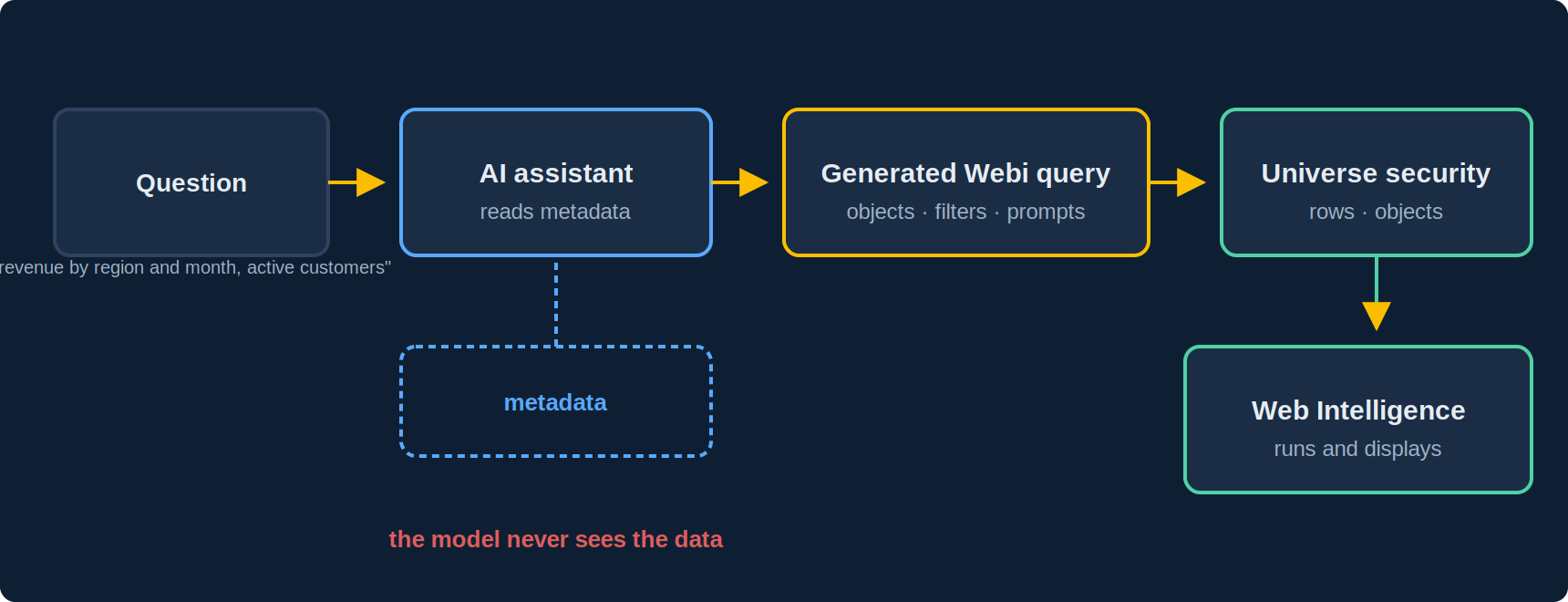
In most tools, “asking AI for your numbers” means sending data to the model, or letting it write SQL on the database. On BusinessObjects, there is a better way: AI works on the universe metadata (object names, descriptions, folders, lists of values) and produces a Webi query specification, which the platform executes normally. Consequences:
- Data does not pass through the model: it only sees the structure. The result displays in Webi, under the universe’s row- and object-level security.
- Figures are the universe’s, hence the same as in every report: no improvised SQL, no parallel measure definitions.
- Object descriptions become the key asset: a documented universe yields good queries, a universe of acronyms yields poor ones. One more reason to care for the semantic layer (see our UNX universes article).
The conditions to do it properly
- Choose where the model runs: a cloud provider’s API, a model hosted in your region, or a model deployed on site. The choice depends on metadata sensitivity and organisational policy; it must stay open, not imposed by the tool.
- Do not send data, or only explicitly chosen aggregates (for summaries): the scope of what goes to the model must be known and configurable.
- Keep a human in the loop: a generated query or variable is displayed, checked and edited before being run or saved. AI proposes, the designer validates.
- Trace: who asked what, which query was generated, with which model. Essential in regulated sectors.
- Document the universes: descriptions, folders per domain, up-to-date lists of values. The cheapest and most profitable prerequisite.
Frequently asked questions
Is there AI in BusinessObjects BI 2025?
No, not natively. BI 2025’s new features concern report elements, WIDX, Data mode and the platform. SAP’s AI features are in SAC, Datasphere and S/4HANA.
Will Joule come to Web Intelligence?
Nothing is announced. The published BI 2027 and BI 2029 roadmap mentions no AI assistant in Webi.
Do I need SAP Analytics Cloud to get AI?
If the need is predictive or assisted planning, SAC is SAP’s answer. If the need is creating Webi queries and variables in natural language on existing universes, extensions do it on BO, with no migration or cloud subscription.
Can AI replace a Webi designer?
No. It lowers the expertise needed for a routine query or variable, and frees the designer for universes, complex reports and quality. Dashboards, performance and security remain a craft.
Sources and references
- SAP Community — “SAP Analytics Business Intelligence Statement of Direction, July 2025 update” (BO on-premise / SAC cloud positioning, BI 2025 scope)
- Christian Ah-Soon (SAP), “SAP BI 2025: What’s New In Web Intelligence and Semantic Layer” (no AI feature among the new capabilities)
- SAP — SAP Business AI and Joule product pages (sap.com): AI feature scope per product
- SAP Community — SAP BusinessObjects BI Platform hub (BI 2027 / BI 2029 roadmap)
- Need4Viz field experience generating Webi queries in natural language from universe metadata
Related reading
👉 Discover Need4Viz and what we really bring to SAP Web Intelligence
Need4Viz extends SAP Web Intelligence with advanced dataviz, interactivity, automation and AI capabilities to transform your reports into real decision-making tools.
Discover Need4Viz