


Applies to: BI 4.2, 4.3, BI 2025 · Reading time: 10 min
Definition. The universe is SAP BusinessObjects’ semantic layer: a translation of the data model (tables, joins, columns) into business objects (dimensions, measures, filters) that users handle without writing SQL. The UNX format, designed in the Information Design Tool (IDT), replaced the UNV format of the Universe Design Tool. It is the most durable asset of a BO platform: reports change, universes stay, and their quality decides the reliability of the figures and the performance of everything built on top.
The architecture of a UNX universe
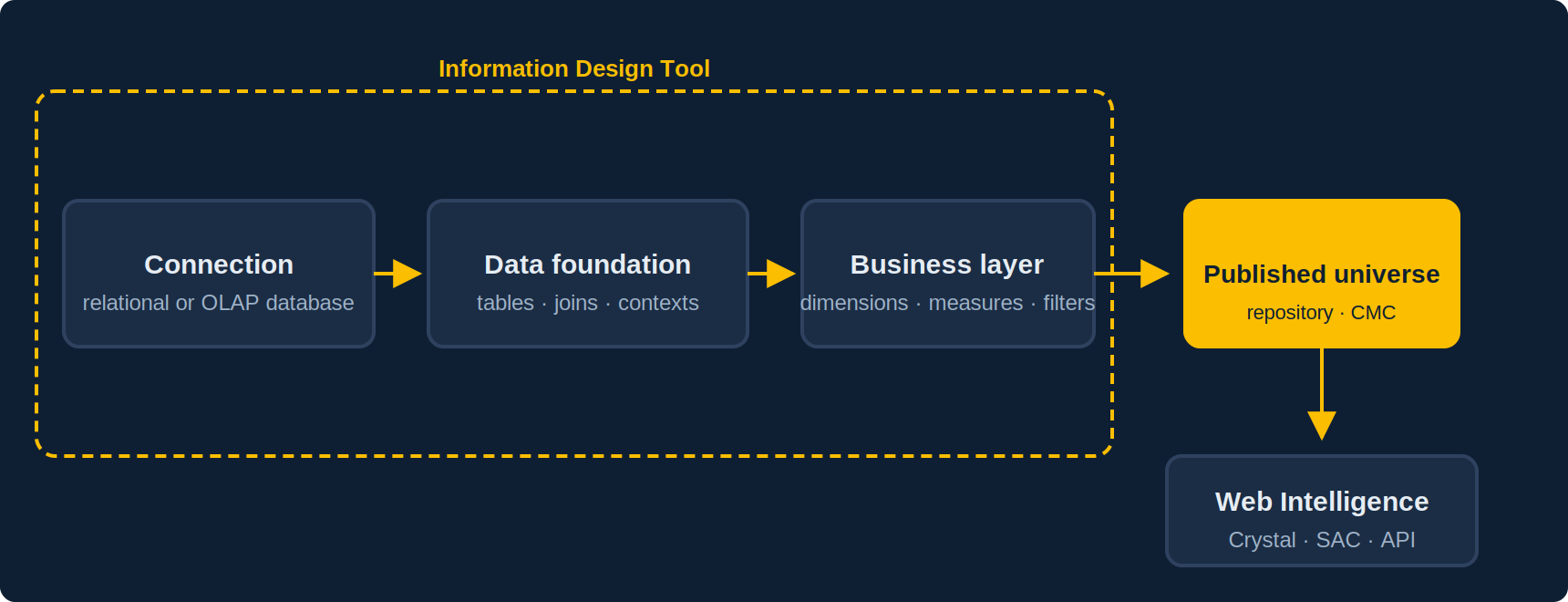
- Connection: the access parameters to the database (relational or OLAP). A secured connection is published to the repository and shared between universes; never hard-code credentials in the universe itself.
- Data foundation: tables, aliases, derived tables and joins with their cardinalities. This is where loops, join traps and contexts are handled. A foundation can be single-source or, up to BI 4.3, multi-source (federating several databases through the Data Federation Service); multi-source universes are no longer supported from BI 2025.
- Business layer: business objects organised in folders, with their SQL definitions, lists of values, predefined filters, restrictions. Several business layers can sit on the same foundation (one per business line, for instance).
- Published universe: the business layer compiled with its foundation and connection, stored in the repository and secured through the CMC.
UNV vs UNX: what really changes
| UNV (Universe Design Tool) | UNX (Information Design Tool) | |
|---|---|---|
| Sources | One only | One only (multi-source possible up to 4.3, removed in BI 2025) |
| Structure | Monolithic file | Project: connection, foundation, separate business layer(s) |
| Team work | Limited | Shared projects, locking, synchronisation |
| Security | Access restrictions | Data and business security profiles, combinable |
| Client tools | Webi, Crystal, Desktop Intelligence (legacy) | Webi, Crystal for Enterprise, SAC (live connection), API |
| Future | Removed from recent versions | Target format of the platform |
UNV → UNX conversion is done from the IDT (Convert .unv universe) on BI 4.x: in BI 2025 the Universe Design Tool, UNV universes and the conversion itself have been removed. Convert before upgrading; a document based on a UNV still opens in BI 2025 but can no longer be refreshed. It is reliable for joins, objects and contexts; what needs a review are proprietary SQL functions, complex @Prompt calls, access restrictions (to recreate as security profiles) and custom lists of values. Plan to test critical reports on the converted universe before switching over.
Seven principles for a universe that lasts
1. Resolve loops with contexts or aliases, never by chance
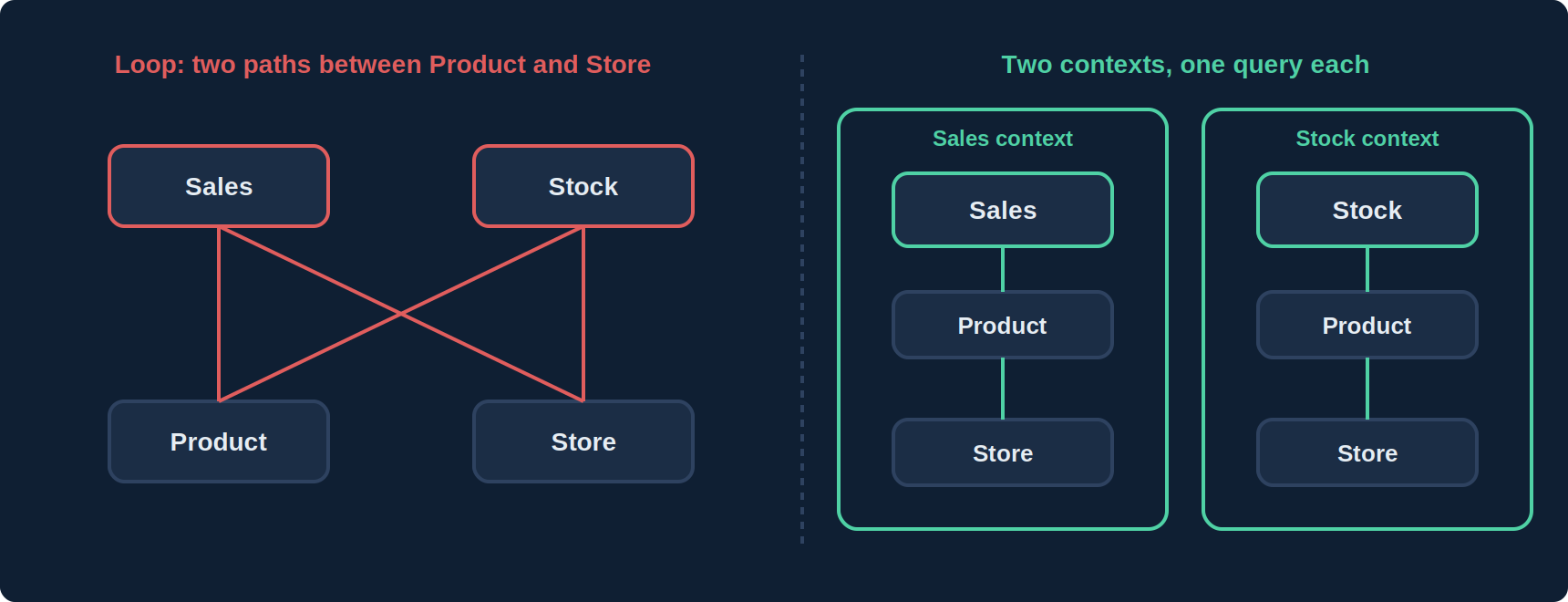
A join loop (two paths between two tables) produces either wrong results or an error. Two tools: an alias when a dimension table plays two roles (order date and delivery date), a context when two fact tables share dimensions (sales and stock). The IDT detects them; the designer chooses. Rule: one context per fact table.
2. Set cardinalities and avoid join traps
Cardinalities (1-N, N-1) are not decorative: they let the IDT detect fan traps and chasm traps, which silently multiply measures. An order-level measure joined to order lines is counted as many times as there are lines. The remedy: contexts, or pre-aggregated derived tables.
3. Put aggregation in the measures, with aggregate awareness
A measure is defined with its SQL aggregation function (SUM(...)) and its Webi projection. If the database holds aggregate tables (sales by month, by region), the @Aggregate_Aware function lets the universe automatically pick the lightest table compatible with the requested objects. It is the most profitable and least used performance lever.
4. Enable index awareness
A “Customer” dimension has a label (what the user sees) and a key (what the database is indexed on). By setting the object’s primary key, generated filters use the key rather than the label: joins avoided, indexes used.
5. Control lists of values
A list of values on a high-cardinality object (address, order number) must be disabled; a list on a reference object (country, status) should be static or cascading; automatic refresh on every open should be the exception. Lists of values are the first cause of slow prompts.
6. Secure with profiles, not duplicated universes
Data security profiles restrict rows (a sales rep only sees their region), tables or the connection; business security profiles restrict visible objects. They are assigned to users or groups in the IDT, combine according to priority rules, and avoid maintaining “the France universe” and “the Spain universe” in parallel.
7. Manage the lifecycle like code
Shared project in the repository, resource locking, a description on every object (shown as a tooltip in Webi), naming conventions, folders per domain, and DEV → TEST → PROD promotion with Promotion Management. A universe with no object descriptions will be reinterpreted differently by every report designer.
Common mistakes
| Symptom | Likely cause | Fix |
|---|---|---|
| Totals too high when adding a dimension | Fan trap or chasm trap | Contexts; check cardinalities; aggregated derived table |
#INCOMPATIBLE in Webi |
Objects from different contexts in one query | Two queries and merge, or revisit contexts |
| Very slow prompts | Lists of values on large objects, automatic refresh | Disable, make static or cascading |
| SQL with useless joins | Filter on label without index awareness; missing shortcut joins | Set keys; add shortcut joins |
| Different figures across two reports | Measures or filters redefined in reports | Centralise the definition in the universe, predefined filters |
Frequently asked questions
Should every UNV be converted to UNX?
Yes, and before BI 2025: that release removes the Universe Design Tool, UNV universes and the conversion tool. Convert the universes still in use on 4.3; archive the others.
Is a multi-source universe a good idea?
Not anymore: multi-source universes are removed in BI 2025. If you have some, replace them with database-side consolidation (view, table) or with several queries combined in Webi.
Where should a calculation live: universe or report?
In the universe as soon as it is reused, sensitive or heavy. In the report only if it is specific to one presentation.
Can a universe feed anything other than Webi?
Yes: Crystal Reports for Enterprise, SAP Analytics Cloud through a live connection, and the REST API/SDK for custom applications.
Sources and references
- SAP Help Portal — Information Design Tool User Guide
- SAP Community — SAP BusinessObjects BI Platform hub
- Christian Ah-Soon (SAP), “SAP BI 2025: What’s New In Web Intelligence and Semantic Layer”, SAP Community, March 2025
- Need4Viz field experience
👉 Discover Need4Viz and what we really bring to SAP Web Intelligence
Need4Viz extends SAP Web Intelligence with advanced dataviz, interactivity, automation and AI capabilities to transform your reports into real decision-making tools.
Discover Need4Viz