


Applies to: BI 4.2, 4.3, BI 2025 · Reading time: 9 min
In short. Distribution is BusinessObjects’ historical strength, and its most under-used capability. Three mechanisms complement each other: scheduling (one document, a recurrence, a format, a destination), events (triggering a run when a file lands or another report has finished) and publications (one document burst into as many personalised versions as there are recipients). Used well, they replace dozens of manual exports and take load off the servers at peak hours.
Scheduling: the basic mechanism
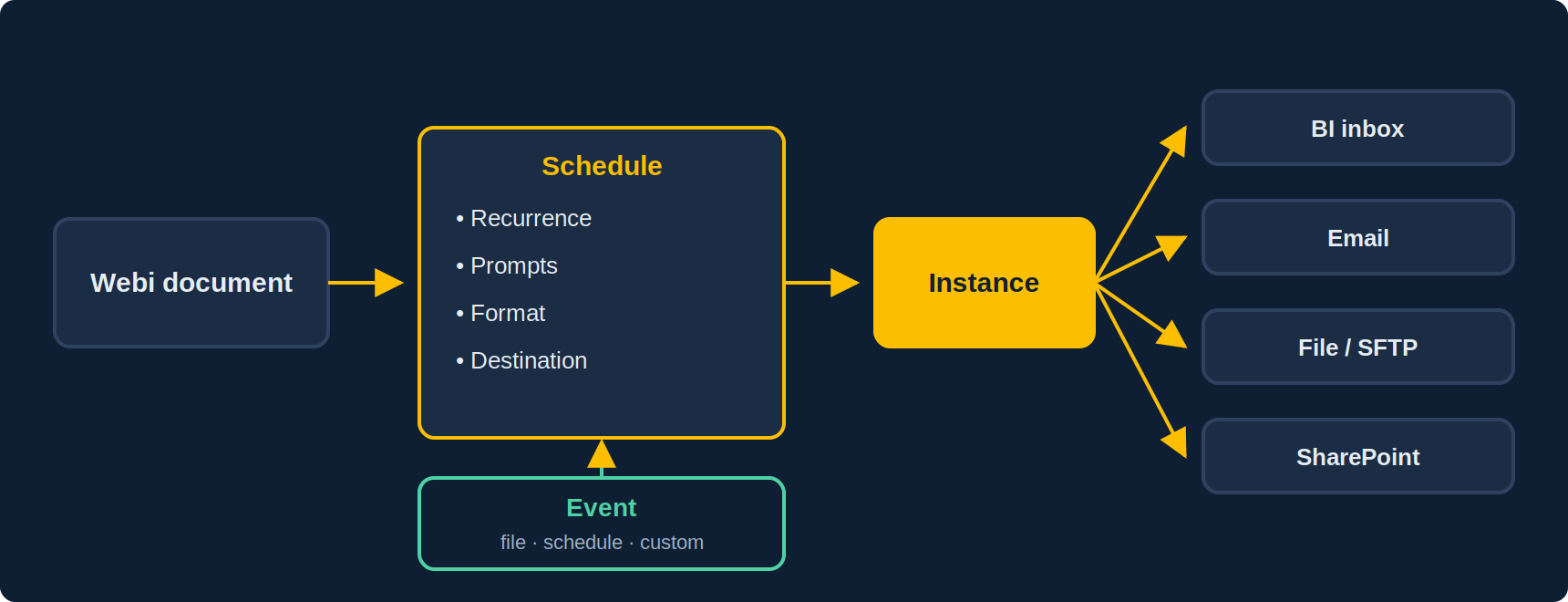
From the BI Launchpad, right-click a document, Schedule. The settings that matter:
- Recurrence: once, daily, weekly, monthly, Nth day of the month, custom calendar (business days, closing dates). The custom calendar, defined in the CMC, avoids runs on public holidays.
- Prompts: values are fixed at scheduling time. A “current fiscal year” prompt beats a hard-coded value that has to be edited every year.
- Format: Webi (an instance viewable in the Launchpad, interactive), PDF, Excel, CSV, text. The Webi format keeps the full document; the others freeze one view.
- Destination: BI inbox, email (with body and attachment), file system, FTP/SFTP, and depending on the version, connectors to SharePoint or cloud storage.
- Instances and limits: the number of instances kept per document is capped in the CMC; too high a cap fills the repository, too low erases history.
Events: orchestrate rather than guess timings
The common reflex is to schedule the report at 6 a.m. “because the ETL finishes at 5”. The day the ETL runs late, the report goes out with yesterday’s data. Events solve this:
- File event: the schedule waits for a file to appear (dropped by the ETL at the end of its run).
- Schedule event: triggered by the success of another schedule, which chains reports together.
- Custom event: triggered by an external call (API, script), to integrate BO into an enterprise scheduler.
A schedule can wait for an event and trigger another when it completes: that is how you build a “load → control report → business publication” chain with no fixed time.
Publications: one document, a hundred recipients, a hundred contents
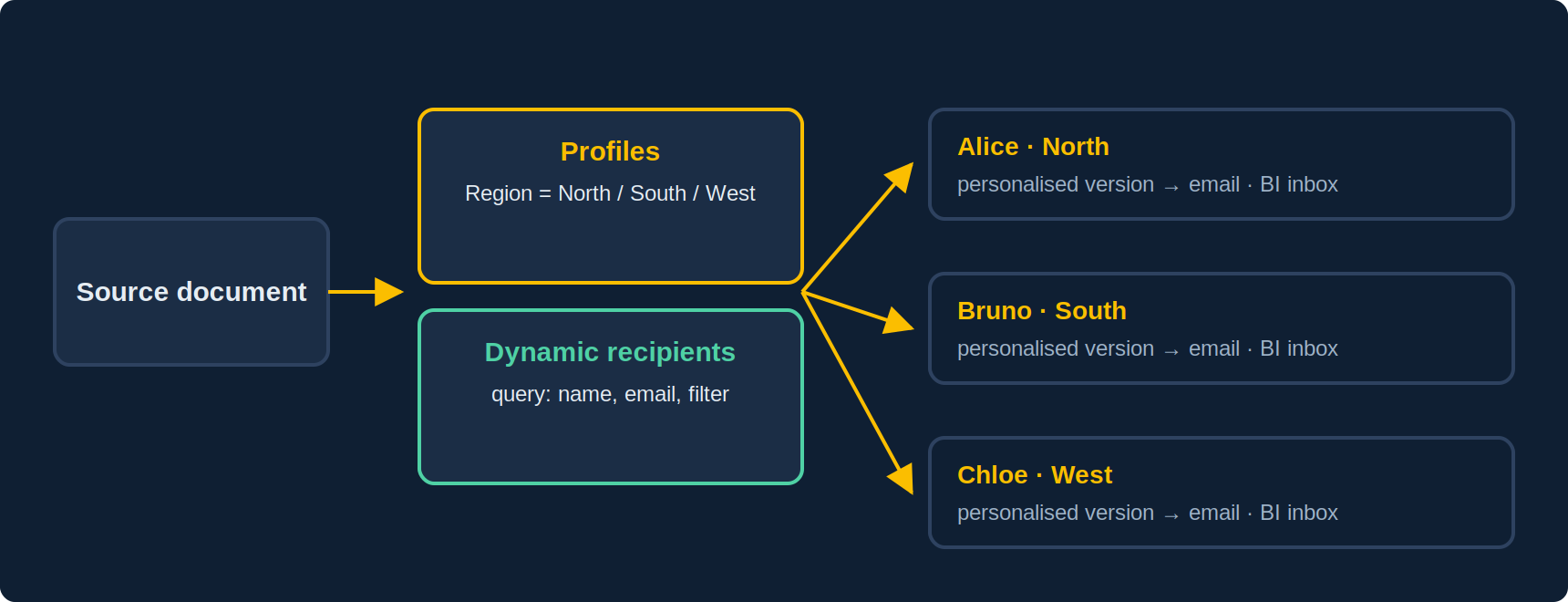
A publication is a separate object, created in the Launchpad or the CMC, that groups one or more documents and a recipient list. Every recipient gets their own version:
- Enterprise recipients: BO users and groups. Personalisation goes through profiles (CMC): a “Region” profile maps each user to their value, and the publication filters the document accordingly.
- Dynamic recipients: the list comes from a Webi or Crystal report (name, email, filter value). This is the answer for external recipients or a list maintained by the business.
- Two bursting modes: one refresh per recipient (maximum security, each run honours the recipient’s rights, but N queries) or one refresh then filter (one query, filtering in the document, far faster). The second is enough when the filter is a simple business criterion.
- Formats and delivery: per recipient, choice of format (PDF, Excel, Webi), destination (email, BI inbox) and file naming (with variables: recipient name, date).
Best practices
- Schedule heavy reports overnight and serve instances during the day: users open an already-computed document, servers are not hit at peak hours (see our performance article).
- A service account for schedules, not a user’s account: when they leave the company, their schedules leave with them.
- Name and document: schedule title, description, business owner. Auditing a BO estate typically reveals 30% of schedules whose output nobody reads anymore.
- Monitor failures: in the CMC, instance history and email alerts on failure. A report that fails silently for three weeks costs more than a slow one.
- Cap instances per document and purge: the repository (CMS) and the FRS grow fast with daily PDFs kept forever.
Classic pitfalls
| Symptom | Cause | Fix |
|---|---|---|
| Emails do not go out | Email destination not configured on the Job Server, or authenticated SMTP | CMC → Servers → Adaptive Job Server → Destinations |
| The report goes out with yesterday’s data | Fixed time, late load | File or schedule event |
| The instance runs at the wrong hour | Server vs user time zone | Check the time zone in preferences and the CMC |
| The publication takes hours | “One refresh per recipient” on hundreds of recipients | Switch to “one refresh then filter” if security allows |
| A recipient sees someone else’s data | Wrong profile value, or filtering on an object missing from the document | Check the profile target and the object’s presence in the query |
| The PDF is unreadable | Screen layout, not page layout | Design the report in page mode, test the export before scheduling |
Frequently asked questions
Can I send a report to people who have no BO account?
Yes, by email with dynamic recipients, as PDF or Excel. They won’t be able to interact with the document; for interactive content outside the platform, you need a standalone HTML export.
Does a schedule consume a license?
The run uses the scheduling account; email recipients need no license. Opening a Webi instance in the Launchpad, however, requires platform access.
Can I schedule with different prompt values for each run?
Yes, by creating several schedules of the same document, or better, with a publication and profiles.
How do I trigger from an external scheduler?
Through a custom event fired via the REST API, or with the SDK. The report stays under BO’s control, the trigger comes from outside.
Sources and references
- SAP Help Portal — SAP BusinessObjects Web Intelligence User’s Guide (BI 4.3 / 2025)
- SAP Community — SAP BusinessObjects BI Platform hub
- SAP Help Portal — SAP BusinessObjects BI Platform Administrator Guide
- Christian Ah-Soon (SAP), “SAP BI 2025: What’s New In Web Intelligence and Semantic Layer”, SAP Community, March 2025
- Need4Viz field experience on BI 4.1 to BI 2025 deployments
👉 Discover Need4Viz and what we really bring to SAP Web Intelligence
Need4Viz extends SAP Web Intelligence with advanced dataviz, interactivity, automation and AI capabilities to transform your reports into real decision-making tools.
Discover Need4Viz