


Applies to: BI 4.3, BI 2025 · Reading time: 9 min
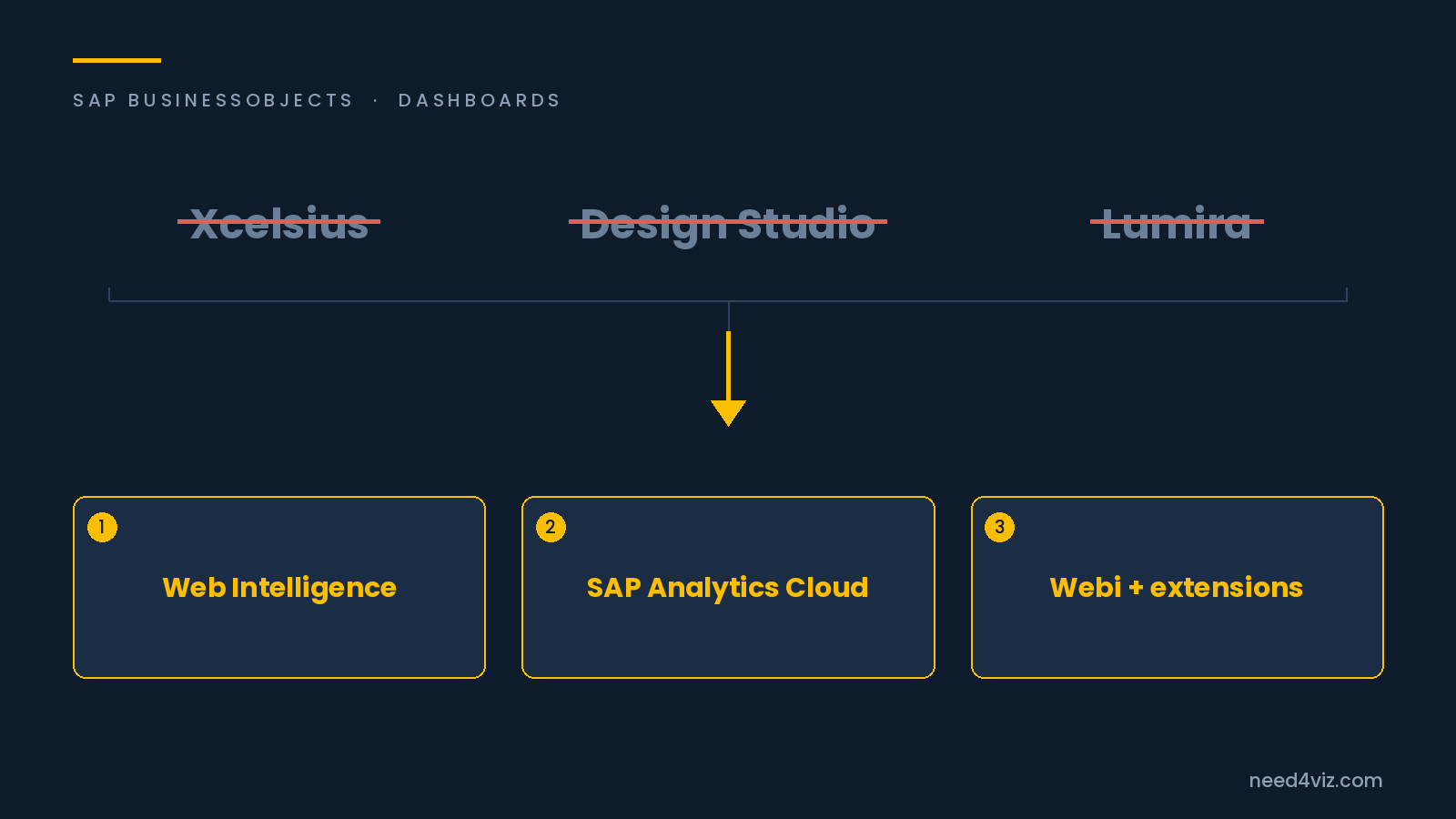
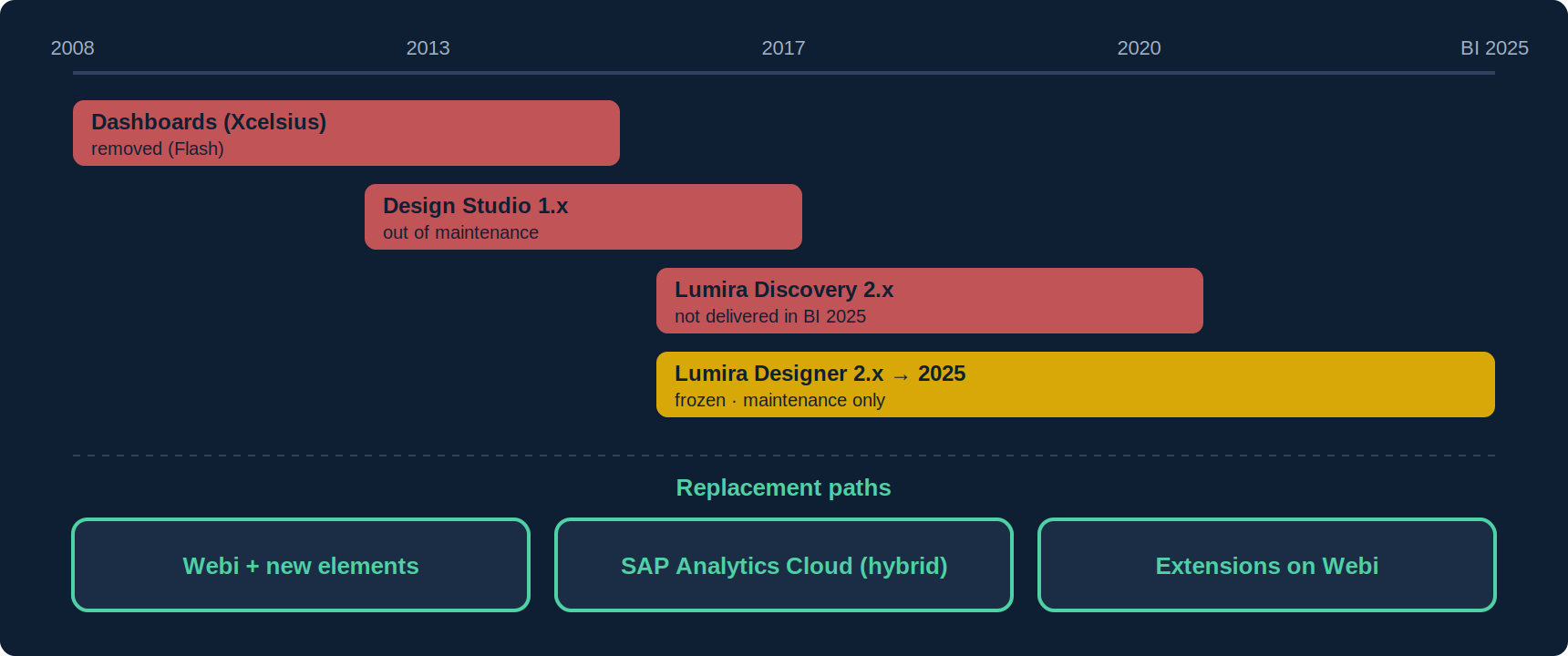
In short. Over fifteen years, SAP successively offered three dashboard tools on BusinessObjects: Dashboards (Xcelsius), Design Studio which became Lumira Designer, and Lumira Discovery. Today, Xcelsius is removed from the platform, Lumira Discovery is not delivered with BI 2025, and Lumira Designer still exists (a 2025 release is available for BI 2025) but has not evolved since 2020. Organisations that built dashboards with these tools must decide their future. Three paths remain open without leaving the platform or losing the universes: Web Intelligence and its new elements, SAP Analytics Cloud in hybrid mode, or extensions on Webi.
Where each tool stands
| Tool | Status | What it means |
|---|---|---|
| Dashboards (Xcelsius) | Removed from the platform since BI 4.3; Flash technology | .xlf files no longer open anywhere; everything must be rebuilt. |
| Design Studio 1.x | Renamed Lumira Designer 2.0 in 2017; out of maintenance | 1.6 .biapp applications run on the Lumira Designer 2.x runtime, with known limitations. |
| Lumira Discovery 2.x | Innovation frozen since 2.4; not delivered with BI 2025 | Discovery stories have no runtime in BI 2025; to be rebuilt elsewhere. |
| Lumira Designer 2.x / 2025 | Innovation frozen since 2.4; Lumira 2.4 at end of mainstream maintenance, priority support extended; a Lumira 2025 release (Designer + Server merged) is compatible with BI 2025 | You can keep running what exists on BI 2025, with no new feature. It is a reprieve, not a strategy. |
| Analysis for OLAP, Live Office | Not delivered with BI 2025 | Often tied to BW dashboards; include them in the inventory. |
SAP’s message has been consistent since 2020: SAP Analytics Cloud is the designated successor to Lumira for dashboards, and Web Intelligence remains the platform’s reporting tool. What that message leaves out is the organisation with a BO estate and universes that wants neither a cloud subscription nor a rebuild project. The third path exists for them.
Before choosing: inventory
- List the applications: .xlf files (Xcelsius), .biapp (Design Studio / Lumira Designer), Lumira Discovery stories, Analysis workbooks. The repository lists them by object type.
- Measure usage: Auditor gives opens per application over the last twelve months. In the estates we see, more than half of Lumira dashboards are no longer viewed.
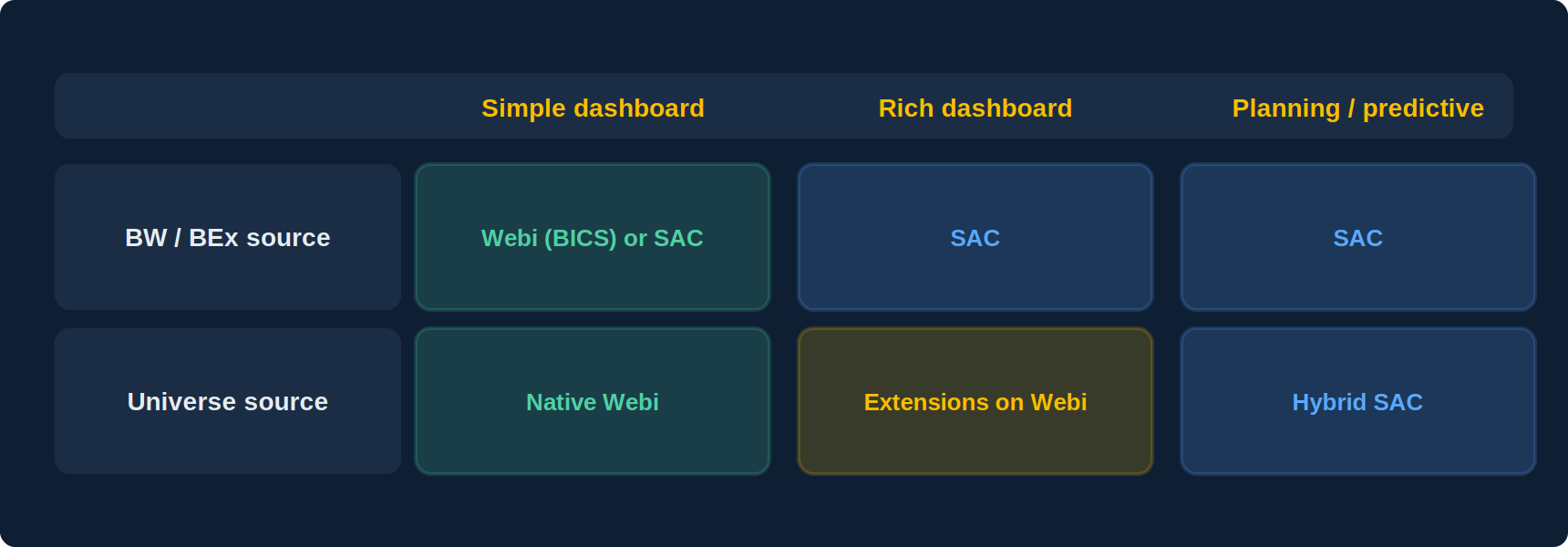
- Qualify the sources: BW/BEx (the majority case for Design Studio) or universes. The source steers the target: BW points to SAC or Webi over BICS, universes point to Webi.
- Qualify the interactivity: simple filters and navigation, or advanced scripting, data entry, external calls. Lumira Designer scripting has no equivalent anywhere; whatever depends on it must be rethought, not migrated.
Three replacement paths
1. Web Intelligence, with BI 2025’s new elements
For simple summary dashboards (KPIs, a few charts, filters), Webi now covers the need: input controls, element linking, and in BI 2025 the scrollable table with micro-charts, in-report filters, containers, CSS. Universes, security and scheduling are reused as they are. Limits: reporting-grade visuals, no multi-directional cross-filtering, off-platform sharing restricted to WIDX. See Can Webi Build a Real Dashboard?
2. SAP Analytics Cloud, in hybrid mode
This is the official successor, and the right choice when the Lumira dashboard was on BW (native live connection), when planning or predictive is needed, or when the landscape is shifting to SAP cloud applications. Universes remain accessible live through Live Data Connect. Trade-offs: per-user subscription, a new skill set, and no automatic reuse of Lumira applications. See BO vs SAP Analytics Cloud.
3. Extensions on Web Intelligence
For organisations whose Lumira or Xcelsius dashboards were built on universes, and that want the visual result without a new platform: extensions installed on BO add to Webi a library of interactive visualisations (gauges, maps, cross-filtering, drill), the assembly of several reports into one dashboard, and a standalone HTML export viewable with no license. The Webi document remains the source, and so do universes and security. It is the shortest path when the inventory shows classic management dashboards rather than scripted applications.
Comparison
| Native Webi (BI 2025) | Hybrid SAC | Extensions on Webi | |
|---|---|---|---|
| Universes reused | Yes | Yes (live) | Yes |
| Native BW source | Yes (BICS) | Yes, strong point | Through Webi (BICS) |
| Visual richness | Medium | High | High |
| License-free sharing | WIDX (limited) | No (subscription) | Standalone HTML |
| Budget planning | No | Yes | No |
| Additional cost | None | Subscription + project | Extension license |
| Skill to acquire | None | SAC | Light (inside Webi) |
Frequently asked questions
Can we keep Lumira Designer on BI 2025?
Yes, with Lumira 2025 (Designer and Server merged), compatible from a specific BI 2025 patch listed in SAP’s compatibility matrix. With no new feature: it is a way not to block the platform upgrade, not a target.
Is there a Lumira → Webi or → SAC converter?
No. Lumira Designer applications are code (scripting, components) with no direct equivalent. You start again from the query and the need, not from the file.
What about old Xcelsius dashboards?
They are unrecoverable as is (Flash). In practice they are often the easiest to replace: a few gauges and charts over one query, which extended Webi reproduces in a few hours.
Where to start?
With inventory and usage. Archive what is no longer opened, sort the rest by source and complexity, and handle the simple universe-based dashboards first: they are the most numerous and the fastest to replace.
Sources and references
- SAP Community — “SAP Analytics Business Intelligence Statement of Direction, July 2025 update” (components not delivered with BI 2025: Lumira Discovery, Analysis for OLAP, Live Office, Mobile)
- SAP Community — “Lumira in BI2025” (Lumira 2025, Designer + Server merge, BI 2025 compatibility)
- SAP KBA 3582179 — Products and features deprecated or removed in SAP Lumira Designer 2025
- SAP Community — Lumira 2.x end of maintenance (SAP Note 2902872)
- SAP Community — Migrating Design Studio 1.6 to Lumira Designer 2.x (KBA 2665179)
- Need4Viz — “Is Need4Viz a good solution to replace SAP Lumira Discovery and Designer dashboards?”
- Need4Viz field experience replacing Xcelsius and Lumira dashboards
👉 Discover Need4Viz and what we really bring to SAP Web Intelligence
Need4Viz extends SAP Web Intelligence with advanced dataviz, interactivity, automation and AI capabilities to transform your reports into real decision-making tools.
Discover Need4Viz