


How to evolve your SAP BI without disruption or risky migration
SAP BusinessObjects Web Intelligence is a proven reporting platform used by thousands of organizations worldwide. But WebI alone cannot deliver modern interactive dashboards — and that gap is pushing many BI teams toward costly migrations to SAP Analytics Cloud or Power BI.
There is a faster alternative: N4V FOR WEBI.
N4V FOR WEBI is the easiest way to transform SAP Web Intelligence into a modern BI dashboard platform — without rebuilding your data models, without retraining your teams, and without replacing your SAP BO investment. Organizations like McKesson, Banque de France, and Chantiers de l’Atlantique chose this path.
This guide explains why full migration is rarely the right answer, and how a progressive modernization strategy using N4V FOR WEBI delivers modern dashboards in days — not months.
The CIO’s Dilemma with WebI
You’re a CIO or BI manager. Your SAP BusinessObjects environment works, your universes are stable, and your teams have mastered WebI. But pressure is mounting: business users want modern dashboards, executive leadership compares your reports to cloud-based tools they see in the press, and internal voices are pushing for a full migration to SAP Analytics Cloud or Power BI.
The problem? Migrating means rebuilding. Years of investment in universes, reports, training, and business processes — all of it would need to be redone, with considerable project risk and costs that are hard to justify.
The real challenge isn’t replacing WebI — it’s evolving it to keep pace with your users’ expectations.
Why Full Migration Is Rarely the Right Answer
The Hidden Cost of Migration
Migrating to SAP Analytics Cloud or Power BI isn’t just a tool change. It’s a complete overhaul of the decision-making chain: recreating data models, rewriting reports, retraining users, implementing new governance, and managing new access rights.
The Human Risk: The BusinessObjects Brain Drain
Your best BO experts are retiring or moving on. Launching an 18-month migration in this context means risking the loss of critical skills midway through. Modernizing with N4V lets you immediately leverage existing expertise and make WebI attractive again for new hires.
The Progressive Modernization Strategy
Step 1: Immediate Visual Impact (Week 1)
Install N4V FOR WEBI and transform 2 or 3 key reports with modern components: KPI tiles, interactive charts, gauges. The “wow” effect on users and leadership is immediate.

N4V FOR WEBI — Sales dashboard transformed with modern components
Step 2: Interactive Dashboards (Month 1)
Enable cross-component interactivity to create real dashboards. Add advanced navigation filters, MultiChart components, and interactive drill. Your reports become exploration tools.
Step 3: Mapping and Spatial Analysis (Month 2)
Integrate GIS components for geographically-driven reports: sales distribution, territorial coverage, network analysis. Drillable maps effectively replace cross-tab tables.

N4V Maps — Mapping natively integrated into SAP Web Intelligence
Step 4: Broader Distribution with N4V Publisher (Month 3)
Export your dashboards as interactive HTML5 to make them accessible without a BO license. Intranet, business portals, internal websites: you multiply your report audience without additional license costs.
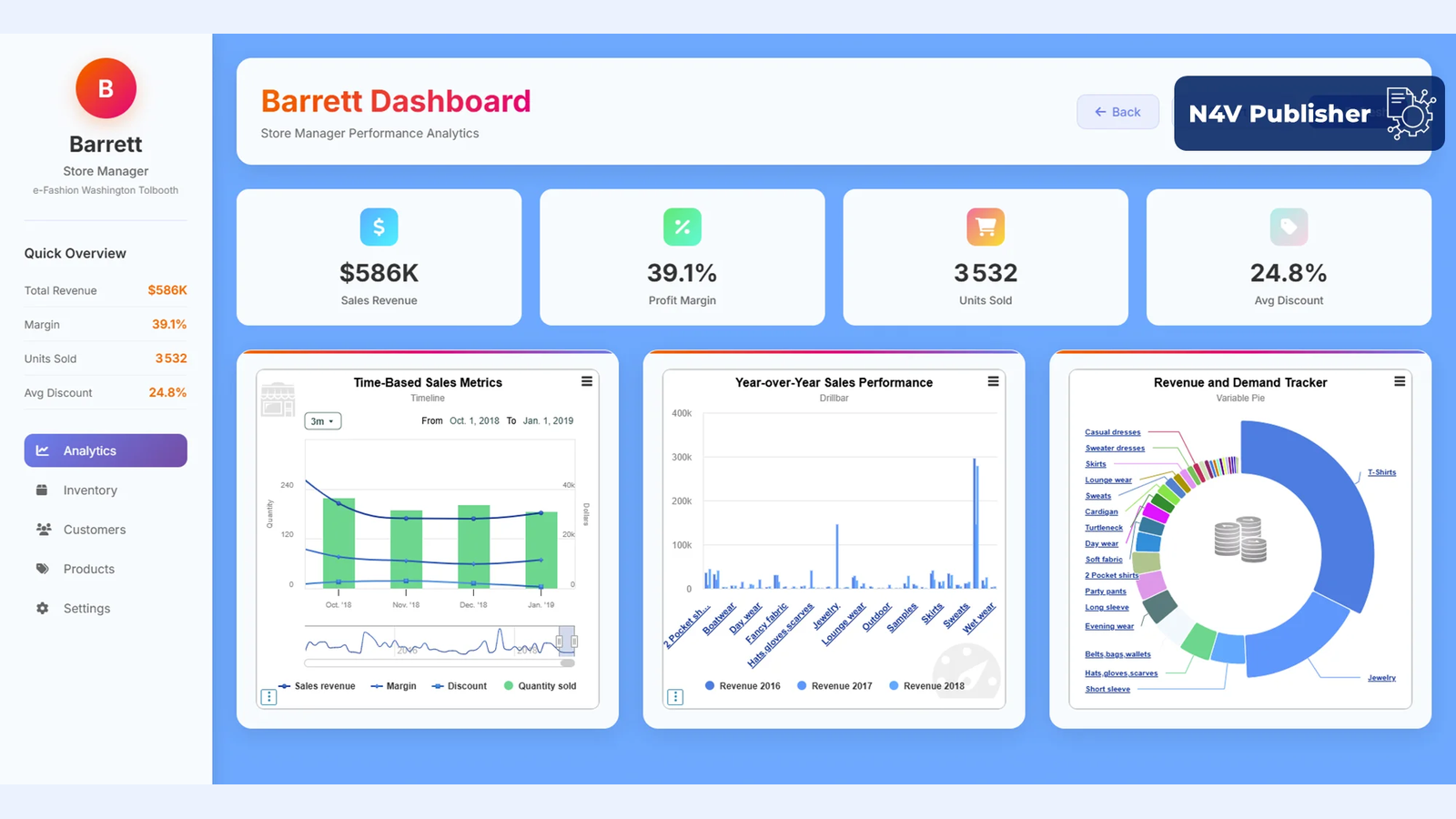
N4V Publisher — Responsive HTML5 export, accessible without an SAP BO license
Step 5: Self-Service BI with N4V Intelligence (Month 4+)
Deploy natural language access so business users can query data directly, without knowing the BO universes. This is self-service BI, without leaving the SAP platform.
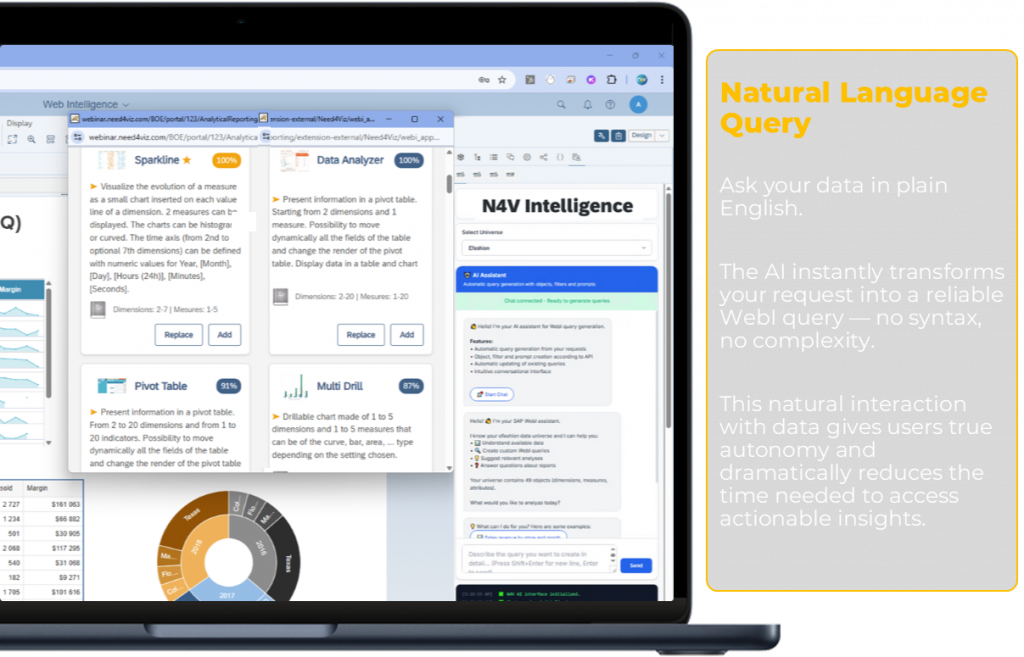
N4V Intelligence — Natural language queries in SAP Web Intelligence
Result: A Rejuvenated BI Platform
In just a few months, without a migration project, you’ll have: modern interactive dashboards, web distribution without additional licenses, integrated mapping, and AI-powered data access. All while preserving 100% of your existing SAP BO investments.
Frequently Asked Questions
Can SAP BusinessObjects WebI create modern interactive dashboards?
WebI alone is limited for modern dashboard design — it lacks native interactive charts, advanced KPI tiles, and HTML5 publishing. With N4V FOR WEBI, organizations can add 60+ interactive visualization types, GIS mapping, and responsive HTML5 export directly inside Web Intelligence, without any platform migration.
What is N4V FOR WEBI?
N4V FOR WEBI is a dashboard and visualization extension suite for SAP Web Intelligence. It transforms WebI into a modern BI dashboard platform by adding advanced charts, interactive components, geographic maps, automated HTML5 publishing, and AI-powered natural language queries — all within the existing SAP BusinessObjects environment.
Is N4V FOR WEBI an alternative to SAP Analytics Cloud?
For organizations that want to modernize their SAP BO dashboards without migrating to a new platform, N4V FOR WEBI is a direct alternative to SAP Analytics Cloud. It preserves existing universes, reports, and user skills while delivering a comparable modern dashboard experience inside WebI.
How long does it take to modernize WebI dashboards with N4V FOR WEBI?
The first modern dashboards can be live within days of installation. A full progressive rollout — from visual modernization to interactive dashboards, GIS mapping, HTML5 distribution, and AI-powered queries — typically takes 4 to 6 weeks, compared to 12 to 24 months for a full platform migration.
Does N4V FOR WEBI require additional SAP licenses?
No. N4V FOR WEBI works within your existing SAP BusinessObjects licensing. The N4V Publisher module also allows dashboard distribution in HTML5 format to users who do not have a SAP BO license, effectively expanding your report audience without additional SAP license costs.
👉 Discover Need4Viz and what we truly bring to SAP Web Intelligence
Need4Viz extends SAP Web Intelligence with advanced dataviz, interactivity, automation, and AI capabilities to transform your reports into real decision-making tools.
Discover Need4Viz | Request a demo
Related reading
- Leaving SAP BusinessObjects for Power BI or Tableau? The real urgency is not to rush
- SAP Analytics Cloud vs. SAP BusinessObjects + N4V
- Is Need4Viz a good solution to replace SAP Lumira Discovery and Designer dashboards?
- SAP BusinessObjects + Need4Viz vs Power BI
- Turn SAP Web Intelligence into a true dashboarding platform
- Data Visualization: The Complete Guide
👉 Discover Need4Viz and what we really bring to SAP Web Intelligence
Need4Viz extends SAP Web Intelligence with advanced dataviz, interactivity, automation and AI capabilities to transform your reports into real decision-making tools.
Discover Need4Viz