


Applies to: BI 4.2, 4.3, BI 2025 · Reading time: 10 min
Definition. Merging dimensions is the mechanism that lets Web Intelligence display, side by side in one block, data coming from several data providers (queries, universes, files). Two merged dimensions become a single dimension in the eyes of the report; each provider’s measures synchronise on its values. It is Webi’s equivalent of a join, performed in the document rather than in the database, with its own rules and its own pitfalls.
When do you need several queries?
- Different sources: a relational universe and a BW source, a database and a budget Excel file, two business applications.
- Avoiding join traps: sales and targets in two fact tables with no direct link; bringing them back in one query multiplies the measures (fan trap). Two queries merged on the common dimension give the right result.
- Different granularities: order-line detail on one side, a monthly reference table on the other.
- Security or performance: isolating a heavy query or one subject to specific restrictions.
How merging works
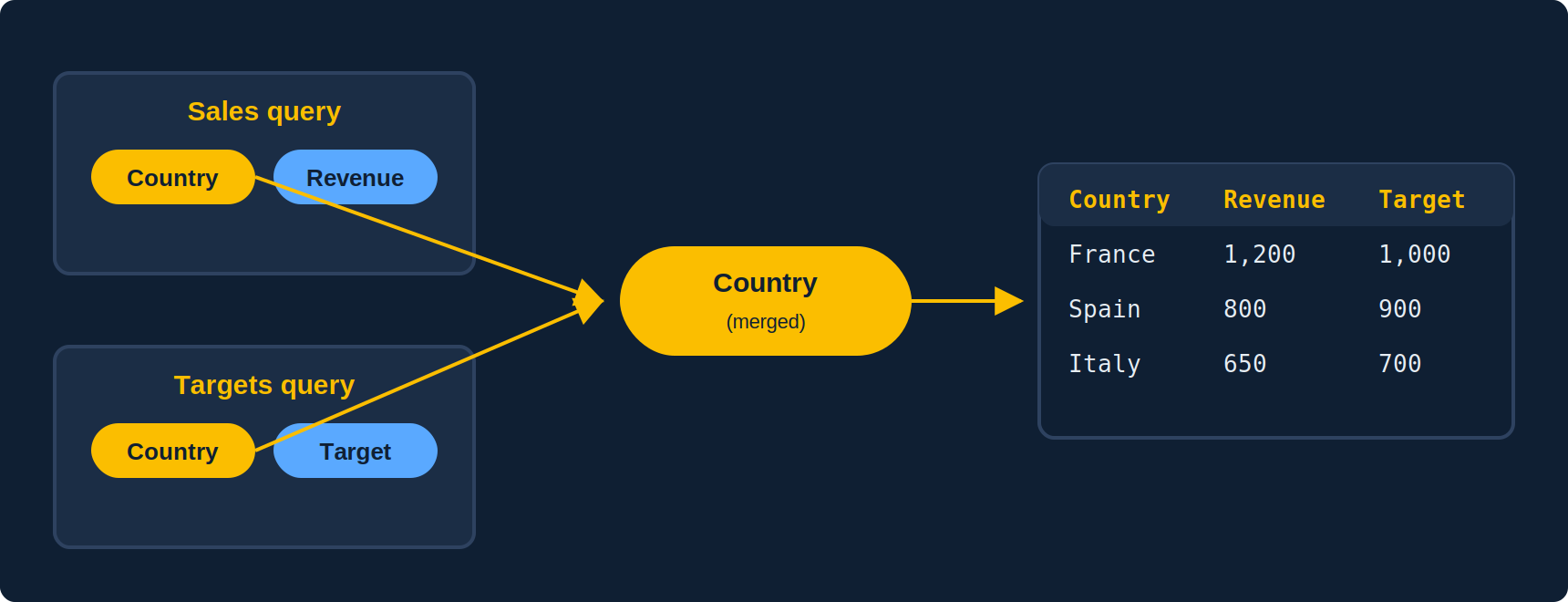
- Automatic merge: by default, Webi merges dimensions that share the same name, data type and universe (Auto-merge dimensions option in document properties). Handy, but turn it off on complex documents: an unintended merge is hard to spot.
- Manual merge: select two (or more) dimensions from different providers in the objects panel, then Merge. They must share the same data type; labels must match exactly (case, spaces, accents).
- What merges: dimensions only. Measures synchronise automatically through the merged dimension. Details (attributes) and unmerged dimensions from one provider cannot be placed in a block containing objects from the other provider, except through a detail variable (see below).
- Values present on one side only: by default the block shows values present in both providers. The Extend merged dimension values option shows every value (equivalent to a full outer join); missing measures show as empty.
The detail variable: bringing in an unmerged object
Common case: the Sales query holds Country and Revenue, the Reference query holds Country, Region and Manager. After merging on Country, you want Region next to revenue: Webi refuses (#DATASYNC), because Region is not merged. The fix is a Detail-type variable with the formula =[Region] and Country (merged) as its associated dimension. That variable becomes usable in the block, provided each country has a single region: otherwise, #MULTIVALUE.
The granularity trap
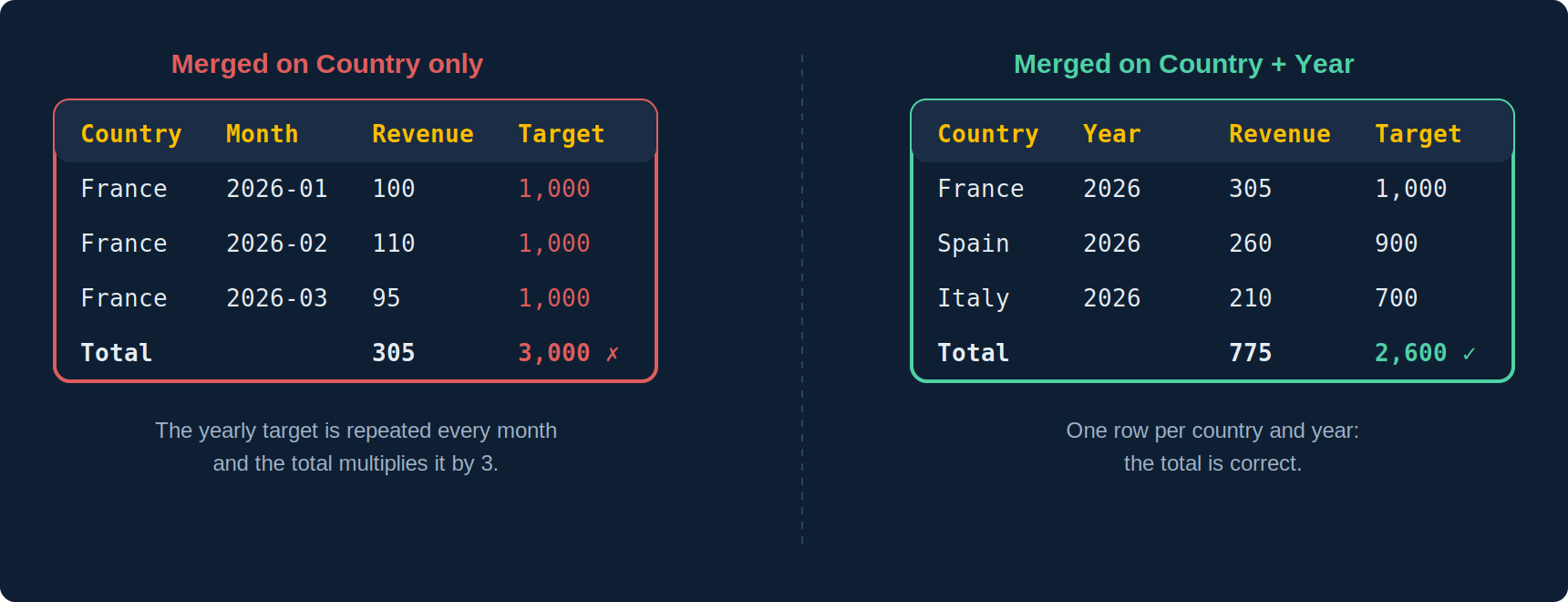
If sales are monthly and targets yearly, merging on Country alone shows the yearly target on every monthly row, and the block total multiplies it by twelve. Three remedies: also merge on Year and only display the target at year level; bring sales back to yearly level in the query; or compute the target with an explicit context, =Max([Target] In ([Country];[Year])), to prevent summation. General rule: merge on every dimension common to both providers, not just the obvious one.
Errors and fixes
| Error | Cause | Fix |
|---|---|---|
#DATASYNC |
The block mixes an unmerged dimension from one provider with objects from the other | Merge the dimension, or create a detail variable attached to a merged dimension |
#INCOMPATIBLE |
Objects from the same universe belonging to different SQL contexts | Split into two queries, then merge |
#MULTIVALUE on a detail variable |
Several detail values for one value of the merged dimension | Attach the detail to a finer dimension, or aggregate |
| Missing rows | Values present on one side only, or differing labels (“FRANCE” vs “France”) | Enable extended merged values; harmonise labels in the universe or with a variable |
| Multiplied measure | Merge at a finer level than the measure | Merge on every common dimension, or use an explicit calculation context |
| Merge refused | Different data types (date vs text, integer vs string) | Convert in the universe, or create a conversion variable and merge on it |
The alternative: combining cubes in Data mode
Since BI 4.3 SP3, Data mode lets you combine two cubes (left, right, inner join, with or without intersection since BI 2025) before even building the report. The result is a single cube, with no #DATASYNC and no detail variable, and SAP indicates this approach should become the recommended practice instead of merged dimensions. Merging remains necessary on earlier versions and for existing documents.
Merging on a variable
Since BI 4.1, you can merge variables, not only universe objects. This is the fix when keys differ by format: =Upper(Trim([Country])) on one side, =FormatDate([Date];"yyyy-MM") on the other to align a month with a period. Create a variable of the same type in each provider, then merge the two variables.
Best practices
- Name your queries (Sales, Targets, Reference): the objects panel becomes readable and errors are located quickly.
- Turn off auto-merge as soon as a document exceeds two queries, and merge manually.
- Merge on low-cardinality dimensions when possible: synchronisation is row by row, and a merge on a transaction ID is expensive (see our performance article).
- Check totals after merging on a flat table before building the report.
- Ask whether the merge is really needed: a view or consolidated table on the database side, or an extra object in the universe, is often simpler and faster than merging in every report.
Frequently asked questions
Can measures be merged?
No. Only dimensions merge; measures synchronise automatically on the merged dimension.
Is a merge an inner or an outer join?
By default the block shows common values; with the extended merged values option, every value from both sides is displayed.
Can I merge BW and relational data?
Yes, on dimensions of the same type. Watch out for BW keys (technical code vs label) and hierarchies, which do not merge like flat dimensions.
How many providers can be merged?
Technically as many as needed, but beyond three or four, maintenance and performance degrade quickly. Consolidate upstream.
Sources and references
- SAP Help Portal — SAP BusinessObjects Web Intelligence User’s Guide (BI 4.3 / 2025)
- SAP Community — SAP BusinessObjects BI Platform hub
- Need4Viz field experience on BI 4.1 to BI 2025 deployments
- Christian Ah-Soon (SAP), “SAP BI 2025: What’s New In Web Intelligence and Semantic Layer”, SAP Community, March 2025
👉 Discover Need4Viz and what we really bring to SAP Web Intelligence
Need4Viz extends SAP Web Intelligence with advanced dataviz, interactivity, automation and AI capabilities to transform your reports into real decision-making tools.
Discover Need4Viz